
One column per physio, the whole day at a glance
In Clinidiary, the diary shows one column per physiotherapist, with the day running down the side. Switch between day, week and month. Closed time is shaded, and a red dashed line shows the time right now, so the front desk always knows who should be in which room.
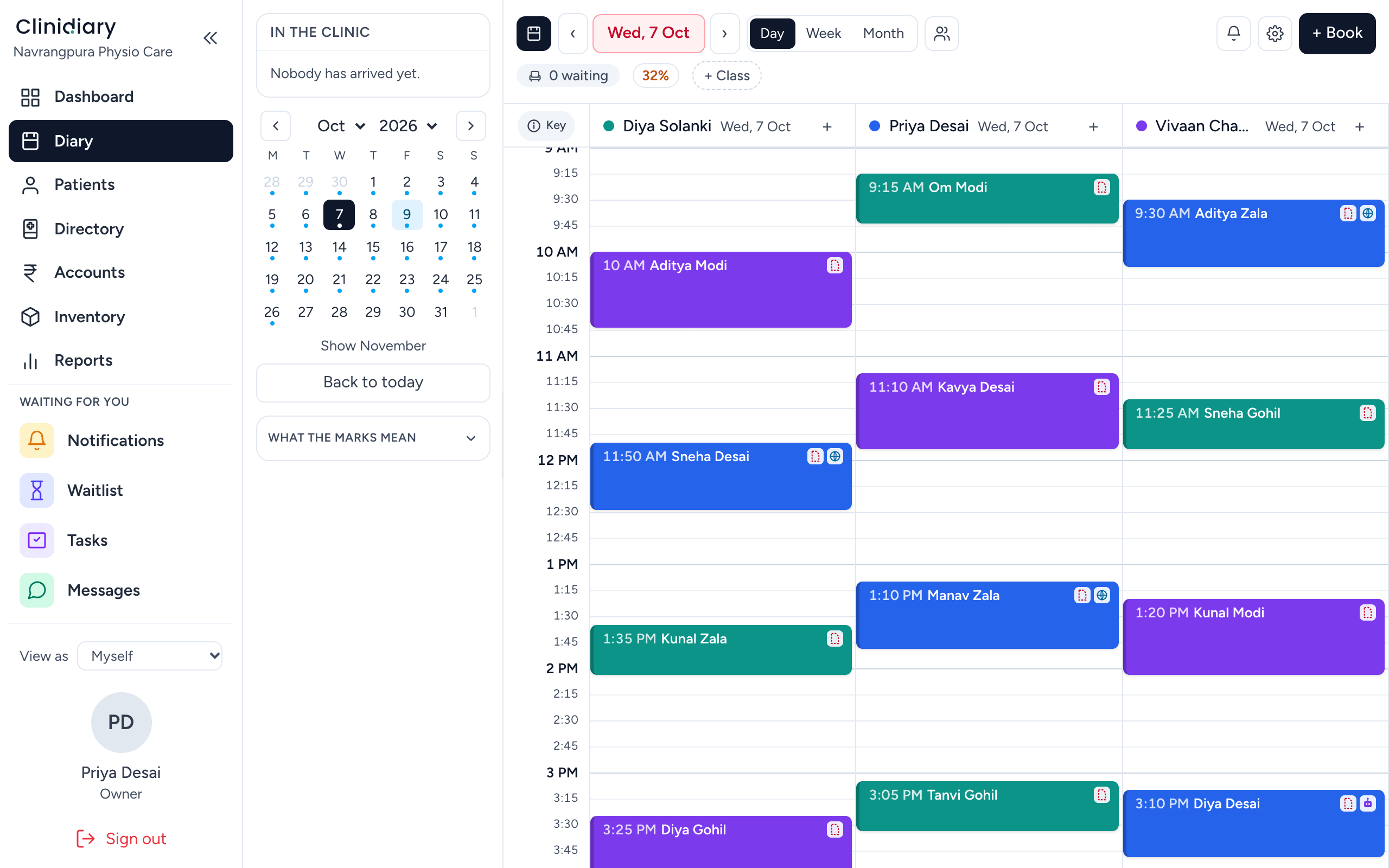
Every booking shows the patient, the service and the state of the visit. Hover to see the whole card. Click to open it.
Booking, moving and stretching
| To do this | Do that |
|---|---|
| Book | Click an empty slot, choose the patient and the service |
| Move | Drag the booking to a new time or another physio's column |
| Make it longer | Drag the bottom edge down |
| Open it | Click the booking |
The service brings its own length and price with it, so a 45-minute assessment books as 45 minutes without anyone working it out.
Find the next free slot
When a patient says "whatever is earliest", use the free-slot search instead of reading the grid. It only offers times where the whole appointment fits inside the physio's working hours, which is hard to see by eye on a full day.
Repeat bookings for a course of treatment
Most physio treatment is a course, not a single visit. Book the whole course at once: daily, on weekdays, weekly up to every four weeks, or monthly. Every repeat is checked before it is saved, and a repeat never lands in a break or a physio's time off.
What the diary refuses, and why
Good scheduling software stops mistakes before they reach a patient:
- No double booking. Two patients cannot hold one physio at the same time. The booking springs back and shows who is already there.
- No bookings when closed. If the physio's diary is not open at that time, the booking is refused. Physios, owners and managers can override this when they mean to; the front desk cannot by default.
- No stretching over the next patient. Making a booking longer into someone else's slot is refused, rather than quietly moving three other people's appointments.
Marking the visit as the day goes
Each appointment moves through simple states: Booked, Confirmed, Arrived, In progress and Completed, or Did not attend and Cancelled.
Arrived matters most. The front desk ticks it as the patient walks in, the physio sees who is waiting, and the dashboard counts who is in the clinic now. Use Did not attend for a no-show and Cancelled for a cancellation. They mean different things, and your clinic reports count them separately.
Alerts the front desk cannot miss
If a patient's file has an alert, for example an allergy, a fall risk or an amount owing, it shows in amber on the booking card. It is there to be read before they arrive.
Notes on the diary
A coloured strip on a column is a diary note: "Asha at a workshop", "Hydro pool cleaning 2 pm", a public holiday. Breaks, travel time for home visits and holidays can be blocked as bands, so nobody is booked into them. Notes are never appointments and never appear in your numbers.
Online bookings land straight in the diary
Patients who book themselves from your online booking page appear in the diary like any other booking. The online page only offers times when the clinic is open and the physio is free.
Cancellations become bookings again
When a patient cancels, the hour is lost unless somebody fills it. Clinidiary's waiting list shows who wanted an earlier time, for that service and that time of day, so the slot can be offered straight away.
Fewer no-shows
The diary feeds your reminders. Each day's WhatsApp reminders are written from tomorrow's bookings, and email reminders go automatically. More ideas in how to reduce no-shows.
Each physio sets their own view
Every physio can set up their own diary view once: start and end of day, slot size, 12 or 24-hour clock and zoom. It changes how they see the diary, not the clinic's hours.
Who changed a booking?
Patients sometimes say "but I booked for 5 pm". Manage → Activity log → Diary changes shows every booking made, moved, cancelled or marked, by whom, with the old time struck through beside the new one.
Frequently asked questions
What is the best appointment scheduling software for a physio clinic?
Look for one built for physios: every therapist side by side, repeat bookings for a course of treatment, a waiting list, reminders, and rules that stop double bookings. Clinidiary does all of these.
Can I book a full course of physiotherapy sessions at once?
Yes. Book repeats daily, on weekdays, weekly up to every four weeks, or monthly. Each one is checked for clashes, breaks and time off.
Can two patients be booked with one physio at the same time?
No. Clinidiary refuses double bookings. For group sessions, use group classes, which have their own roll.
Does the diary work on a phone or tablet?
Yes. The diary works on a phone, a tablet held either way and a computer.
Can I see who moved an appointment?
Yes. The activity log shows every booking made, moved, cancelled or marked, and by whom.